
➢ Tip! Your email address is your login ID for the Public Portal. If you change it, remember to login using the new email address.
➢ Tip! You cannot change your email address using the Update My Information button on either the My Charge or My Case page for a specific case. You must use the Update Account page as described below.
EEOC Public Portal User's Guide
Volume 1: Getting Started
Chapter 4
CHANGE YOUR ACCOUNT INFORMATION
4.0 | CHAPTER 4 INTRO
4.1 | CHANGE YOUR ADDRESS OR PHONE NUMBER
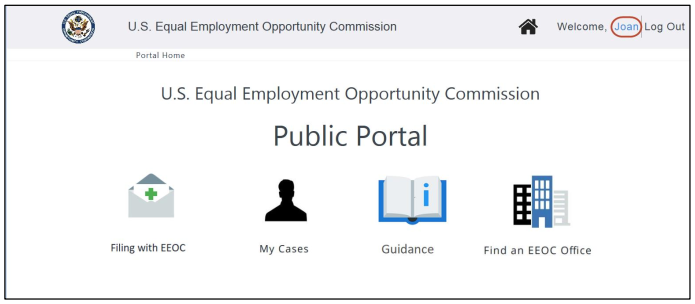 Step 2. Select the OK button to acknowledge the Privacy Policy.
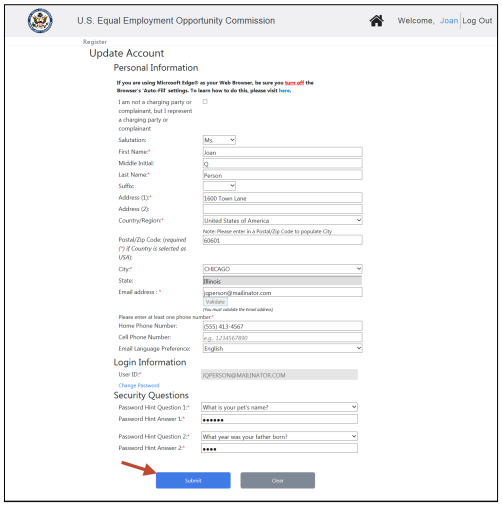
Step 3. The Update Account page displays.
Step 4. Make the necessary changes and select the Submit button to update your account.
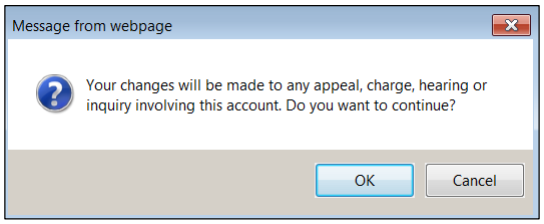
 Step 5. A confirmation pop-up window displays. When prompted “Your changes will be made to any appeal, charge, hearing, or inquiry involving this account. Do you want to continue?” select OK to continue.
 Step 6. The changes are saved, and you are returned to the page where you selected your name link.
4.2 | CHANGE YOUR EMAIL ADDRESS
Step 2. A confirmation pop-up window displays. Select OK to continue.
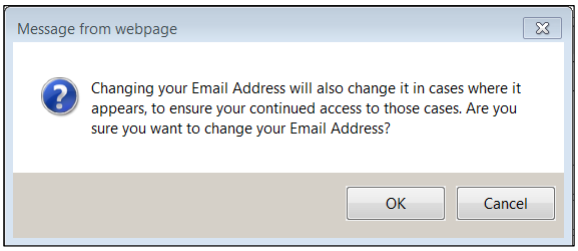 Step 3. Select the Validate button to verify your new email address.
Step 4. A verification code will be sent to the new email address you provided. Enter the code when prompted and select the Submit button. When the pop-up appears indicating the validation was successful, select the OK button.
➢ Tip! Can’t find the email with the verification code? Check your spam folder.
Step 5. Select the Submit button to update your account.Step 6. You will be logged out and returned to the Home page of the Public Portal. Select Login to login again with your new email address.
➢ Tip! Your password and security questions will remain the same.
You might need to reference it during your pursuit of justice.
For instance, you might need to examine one of these passages in order to protect yourself from organizations that have discriminated against you. Please stay vigilant, though, because you might encounter severe pitfalls along the way (see this example of a Florida judge who outright committed perjury).
Nevertheless – and as always – please get the justice you deserve.
Sincerely,
www.TextBookDiscrimination.com


