HomeAboutContact | ...loading...
Buy™ | Sell™ | Shop™ |
iconWebsite
TBD Marketplace™
iconWebsite
TBD Marketplace™Shop™

EEOC Public Portal User's Guide
Volume 1: Getting Started
Chapter 5
THE EEOC PUBLIC PORTAL APPLICATION WINDOW

5.0 | CHAPTER 5 INTRO

The components of the EEOC Public Portal Application Window are described in the subsections that follow.

5.1 | FILING WITH EEOC

The Filing with EEOC link allows you to submit an inquiry, hearing request, an appeal, or a request for reconsideration to the EEOC. After you select the Filing with EEOC link, you will be asked to select the type of employer you work for, worked for, or applied to, and then be directed to the appropriate submission process. (NOTE: If you are an attorney/representative for a complainant do not use this link. You cannot submit a hearing request, file an appeal, or submit a RFR on behalf of your client; only your client can perform these actions.)

5.2 | MY CASES

The My Cases link allows you to track the process of your online inquiries, charges, hearing requests, and/or appeals, respond to the EEOC when an action is required, maintain information on your representatives and your personal contact information, and view/submit documents associated with your case. If you submitted an online inquiry, the My Cases link will allow you to schedule an interview with the EEOC, enter supplemental information, or sign a Charge of Discrimination, depending on where you are in the process.

5.3 | GUIDANCE

The Guidance link allows you to access the EEOC Public Portal User Guides. Here you can get information about how to use the EEOC Public Portal. Select a link to display the document. Select the Back button to return to the previous page.

To display the Guidance page, Select the Guidance link on the Home page. The Guidance page is shown in Figure 2 below.
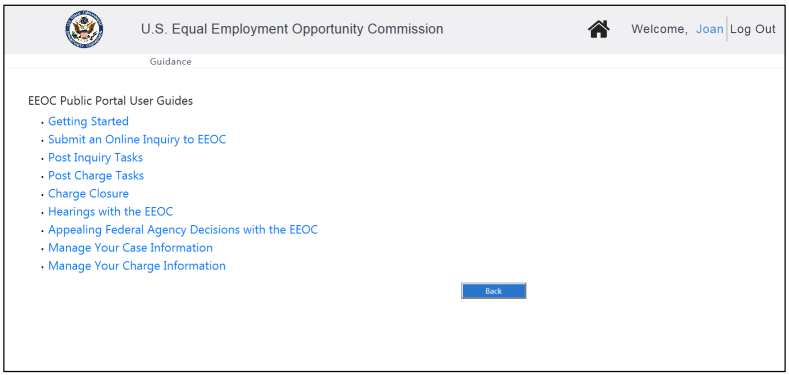
Figure 2 = Guidance Page
SnapshotInstructions

5.4 | LOCATE AN EEOC OFFICE

If you need help locating an EEOC office, the Find an EEOC Office link will help you. Selecting the link brings up a map of the EEOC districts in the United States, as shown in Figure 3 below. Enter a zip code or select the link below the map to display information about a specific EEOC office.

To display the Locate an EEOC Office page, select the Find an EEOC Office link on the Home page:
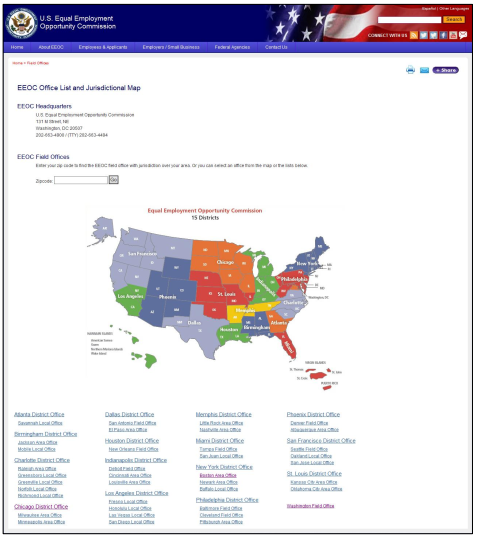
Figure 3 = Locate an EEOC Office Page
SnapshotInstructions
Congratulations! You're now booked up on Chapter 5 from 'Volume 1: Getting Started' of the EEOC's Public Portal User's Guide!
You might need to reference it during your pursuit of justice.

For instance, you might need to examine one of these passages in order to protect yourself from organizations that have discriminated against you. Please stay vigilant, though, because you might encounter severe pitfalls along the way (see this example of a Florida judge who outright committed perjury).

Nevertheless – and as always – please get the justice you deserve.

Sincerely,


www.TextBookDiscrimination.com
Buy™ | Sell™ | Shop™ |
iconWebsite
TBD Marketplace™
iconWebsite
TBD Marketplace™Shop™
logoAdobe Download
logoTable Portal
logoSurvey Survey
logoInfo FCHR 101: How it Works
iconMusic Audio: Drop the Steal
YouTubeVideo Video: A Judge's Perjury
logoCases A Judge's Perjury
logoHTML How-To: Disqualification
iconWarning Warning: FCHR Bribery
iconWarning Warning: FCHR Corruption
iconWarning Warning: FCHR Discrimination
iconWarning Warning: FCHR Obstructions
Pages That You
Might Also Like
All-in-One
EEOC Regulations
Reading List: Employment Discrimination
How-To: Post-Termination Retaliation How-To: Substantial Weight Review Opposition vs Participation
Shop | TBD Marketplace™
Buy | TBD Marketplace™
Sell | TBD Marketplace™
add a comment
IconQuiz IconLike
iconFullScreenBgnIticonFullScreenEndIt
Icon-Email-WBIcon-Email-WG Icon-Youtube-WBIcon-Youtube-WG Icon-Share-WBIcon-Share-WG