HomeAboutContact | ...loading...
Buy™ | Sell™ | Shop™ |
iconWebsite
TBD Marketplace™
iconWebsite
TBD Marketplace™Shop™

EEOC Public Portal User's Guide
Volume 6: Hearings with the EEOC
Chapter 4
RESPOND TO AN INVITATION TO ADR

4.0 | CHAPTER 4 INTRO

All hearing requests upon submission and docketing are eligible for ADR except for complaints filed against the following Agencies:
1. Decennial Census Agency.

2. Central Intelligence Agency.

3. National Reconnaissance Office.

4. Office of the Director of National Intelligence.

5. National Security Agency.
You can view the invitation to participate in ADR and respond to it via the EEOC Public Portal. When you login, select My Cases and then the hearing number in the list of cases; the invitation displays on the My Case page below the My Case section as shown in Figure 1 below (the full text of the invitation to ADR can be found in Appendix A).

You will have 30 days to respond to the invitation. If you do not respond within 30 days, you will receive a weekly email reminder and if you do not respond after the reminder, EEOC may decide to move your case forward without mediation by assigning it to an Administrative Judge or Pending AJ assignment if your case is yet to be assigned to an Administrative Judge.
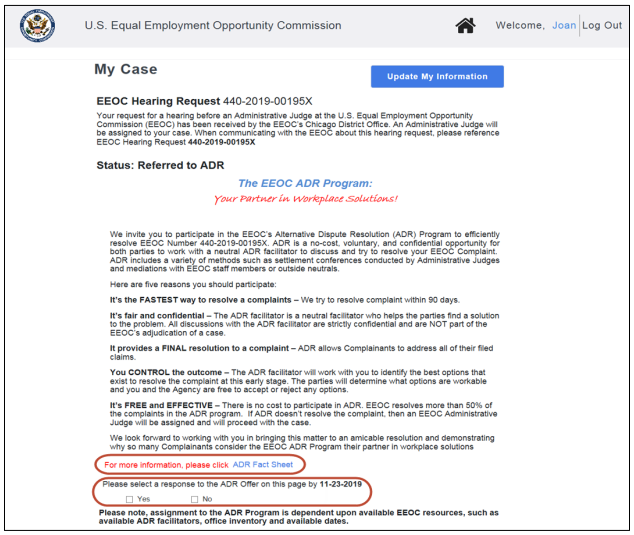
Figure 1 – Invitation to ADR
SnapshotInstructions

4.1 | ACCEPTING OR REJECTING AN INVICATION TO ADR

To respond to an invitation to ADR, perform the following steps:
Step 1. Login to the EEOC Public Portal. On the home page, select My Cases.

Step 2. On the My Cases page, select the EEOC number for your hearing request.

Step 3. On the My Case page, scroll down to where “Invitation to ADR” is displayed (shown in Figure 1 above).

Step 4. Select a response, either ‘Yes’ or ‘No’.

Tip! Select the link at the bottom of the invitation to view the ADR Fact Sheet.

Step 5. If you selected ‘Yes’, this message displays in the EEOC Public Portal:
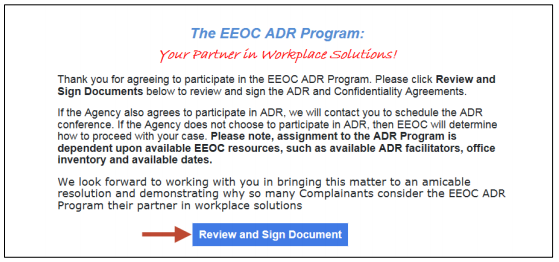
Thank you for agreeing to participate in the EEOC ADR Program. Please click Review and Sign Documents below to review and sign the ADR and Confidentiality Agreements.

If the Agency also agrees to participate in ADR, we will contact you to schedule the ADR conference. If the Agency does not choose to participate in ADR, the EEOC will determine how to proceed with your case. Please note, assignment to the ADR Program is dependent upon available EEOC resources, such as available ADR facilitators, office inventory and available dates.

We look forward to working with you in bringing this matter to amicable resolution and demonstrating why so many Complainants consider the EEOC ADR Program their partner in workplace solutions.
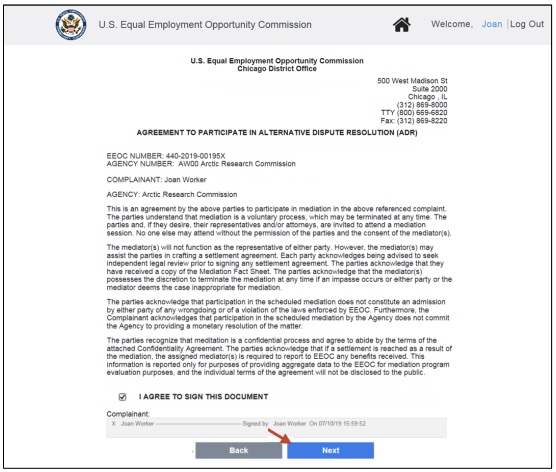
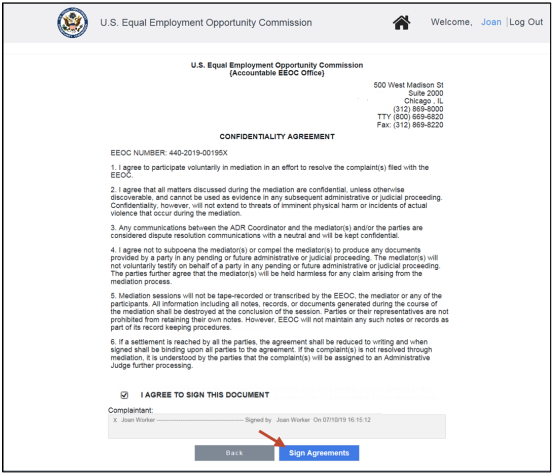
You must review and sign the ADR and Confidentiality agreements if you wish to proceed with the ADR program (the full text of the agreements can be found 0). Select the Review & Sign Documents button. SnapshotInstructions First the Agreement to Participate in ADR displays. Select the box to “check” it and digitally sign the agreement (the signature will be automatically populated), then select the Next button. If you want to go back to the My Cases page, select the Back button SnapshotInstructions Then the Confidentiality Agreement displays. Select the box to “check” it and digitally sign the agreeement (the signature will be automatically populated), then select the Sign Agreements button. If you want to go back to the Agreement to Participate in ADR, select the Back button. SnapshotInstructions You will now be returned to the My Case page. The signed agreements will be automatically uploaded and will appear in the My Documents list. This message displays in the EEOC Public Portal:
Thank you for agreeing to participate in the EEOC ADR program. Please note, assignment to the ADR Program is dependent upon available EEOC resources, such as available ADR facilitators, office inventory and available dates.
If the Agency also agrees to ADR and an ROI has been submitted, then the EEOC may move the case forward to ADR scheduling and you will be contacted to schedule ADR.

Once you have chosen ‘Yes’ and signed the documents, the selection cannot be undone.

Step 6. If you selected ‘No’, select the Save button. This message displays in the EEOC Public Portal:
Thank you for your response. EEOC’s staff will determine how to proceed with the processing of your complaint. We look forward to working with you in bringing this matter to an amicable resolution. If you had previously selected No, you may still select Yes should you decide to change your mind and proceed with the ADR program.

Please note, assignment to the ADR Program is dependent upon available EEOC resources, such as available ADR facilitators, office inventory and available dates.
The radio buttons will remain active in case you change your mind and decide to accept the ADR invitation.

4.2 | ADR OUTCOMES

4.2.1 ADR Scheduled

After you accept the invitation to ADR, if the agency has also agreed to participate in ADR and the EEOC decides to move the case forward to ADR scheduling, this message is displayed on the screen:
Both parties have agreed to participate in ADR. EEOC will contact you when the ADR session is scheduled and will provide you with more information. No further action is required from you at this time.
When the ADR session has been scheduled, this message will be displayed on the screen:
An ADR session has been scheduled. Please be sure to make yourself available for this meeting.

4.2.2 ADR Held

When ADR has been held, this message will be displayed on the screen:
Both parties participated in ADR.
If ADR was successful, this message will be displayed on the screen:
The ADR session resulted in a resolution of the complaint. After the executed settlement is uploaded, this matter will be closed.
If a Closure Document is issued, this message will be displayed on the screen:
A Closure Document was issued in the case. To view the document, please access the document section of the Portal.
When the complaint is closed, the following messages will display on the screen:
The case is now closed. Please review the Closure Document for Appeal Rights, if applicable.
If ADR was unsuccessful, this message will be displayed on the screen:
The ADR session did not result in a resolution of the complaint. The parties will receive further instruction on the processing of the complaint from EEOC.
Additional status messages will be displayed as the complaint is processed (refer to Chapter 5).

4.2.3 Not Eligible for ADR

If the EEOC reviews the ROI and determines your case is not eligible for ADR, or you and the Agency declines the ADR invitation, your case will be Pending AJ assignment and this message will be displayed on the screen:
Upon further review this complaint is not considered for ADR and will be assigned to an Administrative Judge to continue processing. However, ADR may be considered after assignment to an Administrative Judge. Your patience is appreciated.
Additional status messages will be displayed as the complaint is processed (refer to Chapter 5).
Congratulations! You're now booked up on Chapter 4 from 'Volume 6: Hearings with the EEOC' of the EEOC's Public Portal User's Guide!
You might need to reference it during your pursuit of justice.

For instance, you might need to examine one of these passages in order to protect yourself from organizations that have discriminated against you. Please stay vigilant, though, because you might encounter severe pitfalls along the way (see this example of a Florida judge who outright committed perjury).

Nevertheless – and as always – please get the justice you deserve.

Sincerely,


www.TextBookDiscrimination.com
Buy™ | Sell™ | Shop™ |
iconWebsite
TBD Marketplace™
iconWebsite
TBD Marketplace™Shop™
logoAdobe Download
logoTable Portal
logoSurvey Survey
logoInfo FCHR 101: How it Works
iconMusic Audio: Drop the Steal
YouTubeVideo Video: A Judge's Perjury
logoCases A Judge's Perjury
logoHTML How-To: Disqualification
iconWarning Warning: FCHR Bribery
iconWarning Warning: FCHR Corruption
iconWarning Warning: FCHR Discrimination
iconWarning Warning: FCHR Obstructions
Pages That You
Might Also Like
All-in-One
EEOC Regulations
Reading List: Employment Discrimination
How-To: Post-Termination Retaliation How-To: Substantial Weight Review Opposition vs Participation
Handbook: Right-to-Sue
TBD.C: Charges TBD.D: Determinations
Handbook: EEOC ADR
Shop | TBD Marketplace™
Buy | TBD Marketplace™
Sell | TBD Marketplace™
add a comment
IconQuiz IconLike
iconFullScreenBgnIticonFullScreenEndIt
Icon-Email-WBIcon-Email-WG Icon-Youtube-WBIcon-Youtube-WG Icon-Share-WBIcon-Share-WG