
To cancel your inquiry, perform the following steps:
Step 2. The login page displays. Enter your user ID and password to login.
Step 3. If you have more than one case submitted with the EEOC, the My Cases listing displays first; select the EEOC Number to access your inquiry.
Step 4. The inquiry status page displays. Select the Opt Out button.
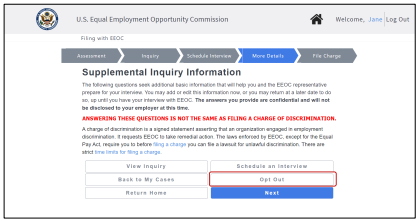
➢ Tip! If you are scheduling an appointment, you may select the Opt Out button from the Appointment Scheduling Page.
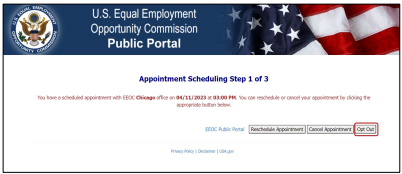
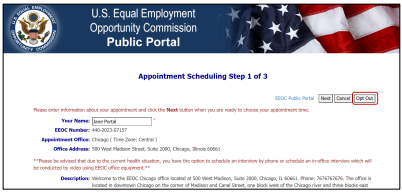 ➢ Tip! If you have already scheduled an appointment, and are rescheduling it, you may select the Opt Out button from the Appointment Scheduling page.
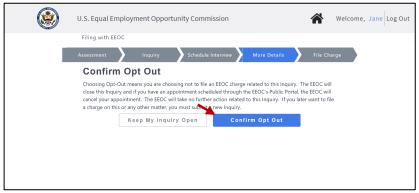
 Step 5. The confirmation page displays. Select the Confirm Opt Out button to close your inquiry.
➢ Tip! If you change your mind, you may keep your inquiry open by selecting the Keep My Inquiry Open button instead (you can still opt to close it at any time). This will return you to the inquiry status page.
 Step 6. The inquiry is closed, and any appointments you scheduled with the EEOC regarding this inquiry are cancelled. You will receive the following email notification:
| FROM: | U.S. Equal Opportunity Employment Commission (EEOC) <noreply@eeoc.gov> |
| SUBJECT: | Notice of Closed Inquiry |
 | U.S. Equal Employment Opportunity Commission |
| This email confirms your voluntary closure of EEOC Inquiry {EEOC Number} and your request that the EEOC take no further action related to this Inquiry. If you had an appointment scheduled through the EEOC’s Public Portal, this email confirms its cancellation. Should you later want to file a charge on this or any other matter, you must submit a new Inquiry in the EEOC Public Portal. Please note there are strict time limits for filing a charge. |


