
Step 2. The My Charge page displays with a prompt to enter supplemental information (as shown in Chapter 2 above). Select the Next button.
Step 3. You will be asked a series of four fill-in-the-blank questions. Answer any or all of the questions. Select the Next button after answering a question. When you are finished entering supplemental information select the Save and Submit button.
Step 4. A confirmation pop-up window displays. Select the OK button to continue.
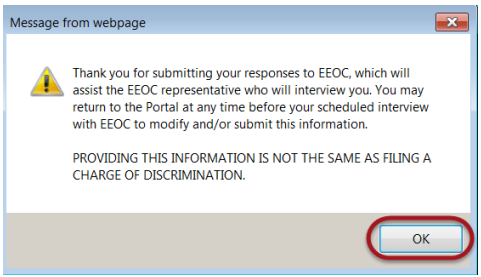
➢ Tip! You may return as often as you wish before the interview to edit the information you provided, until the EEOC locks the inquiry.
➢ Tip! Typically, the EEOC will lock the inquiry 24-48 hours before the scheduled interview, to review the information submitted. If you login to the Public Portal when the inquiry is locked, a message displays indicating that “additional information cannot be entered at this time”. You can still view the information you submitted for the inquiry by selecting on the View Inquiry button.


