
EEOC Public Portal User's Guide
Volume 4: Post-Charge Tasks
Chapter 3
AMEND YOUR CHARGE
3.0 | CHAPTER 3 INTRO
You may amend a charge in the EEOC Public Portal by digitally signing the amended charge of discrimination that the EEOC prepares for you. Using the EEOC Public Portal you and/or your representative (if you have one) can review the document and recommend changes to it, but your representative cannot sign an amended charge of discrimination on your behalf.
3.1 | REVIEWING AN AMENDED CHARGE
3.1.1 Review by Charging Party (CP)
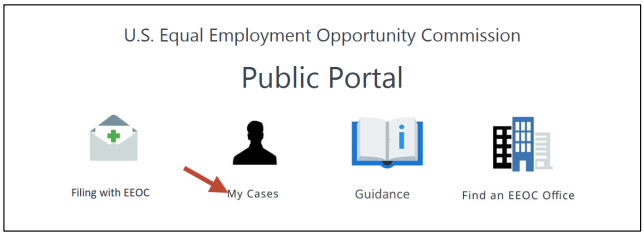
To review an amended charge of discrimination and recommend changes to the EEOC, perform the following steps:Step 2. Open the EEOC Public Portal and select My Cases.
Step 3. The sign in page displays. Enter your user ID and password to login.
 Step 4. If you have more than one case submitted with the EEOC, the My Cases listing displays first; select the Charge Number to access the My Charge page.
Step 5. The My Charge page displays with the information relating to the Amended Charge of Discrimination that the EEOC has prepared.
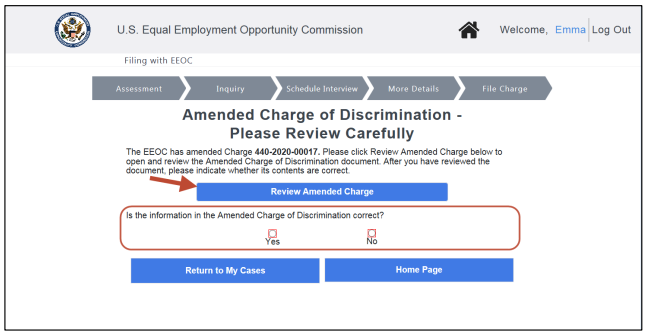 Step 6. Select the Review Amended Charge button to view the Amended Charge of Discrimination, then use the Yes/No buttons to reply to the question “Is the information in the Amended Charge of Discrimination correct?”.
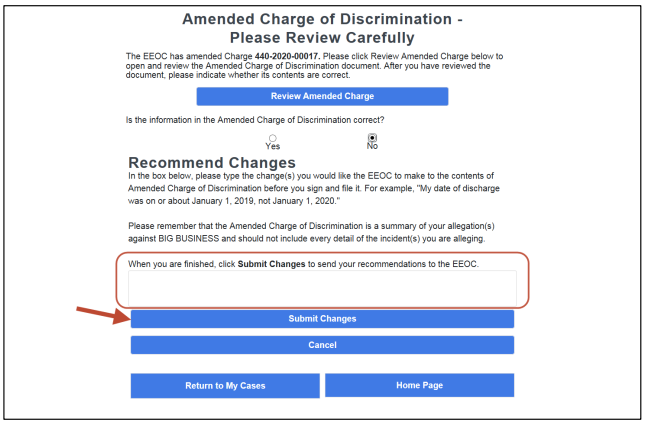
Step 7. If you want to make changes or corrections to the Amended Charge of Discrimination, select the No button. A space to enter changes and a Submit Changes button are displayed.
Enter your recommendations in the space provided and select the Submit Changes button. Your changes are automatically sent to the EEOC.
 The EEOC addresses the recommended changes and sends the modified document back to you for review (Note: this step can be repeated if necessary).
Step 8. You can then sign and file the Amended Charge of Discrimination (refer to Section 3.2 below).
3.1.2 Review by CP’s Representative
To review an amended charge of discrimination and recommend changes to the EEOC, perform the following steps:Step 2. If you want to make changes or corrections to the Amended Charge of Discrimination, select the No button. A space to enter changes and a Submit Changes button are displayed (refer to illustration in Step 7 above).
Enter your recommendations in the space provided and select the Submit Changes button. Your changes are automatically sent to the EEOC.
The EEOC addresses the recommended changes and sends the modified document back to you for review (Note: this step can be repeated if necessary).
Step 3. If the Amended Charge of Discrimination is correct, select the Yes button. The CP can then sign and file the Amended Charge of Discrimination. The following message displays:
Our records indicate that you are not the charging party named in the Amended Charge of Discrimination but are representing the charging party. Only the charging party may sign & file the Amended Charge through the EEOC Public Portal.
3.2 | SIGNING & FILING AN AMENDED CHARGE (CPS)
Step 2. Once you have verified that the document is correct, to sign and file the Amended Charge of discrimination, select the Yes button. The confirmation page appears.
Step 3. Check the box to confirm that the information in the charge is true and correct, then select the Sign & File button.
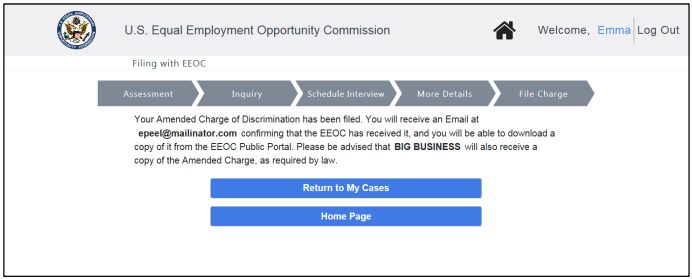
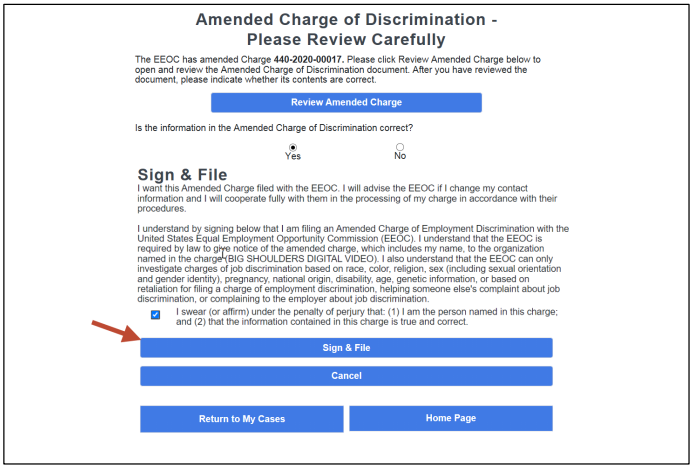 Step 4. The Amended Charge of Discrimination is automatically regenerated to add your electronic signature and uploaded. A signed copy of the Amended Charge of Discrimination will be emailed to you.
Select either the Return to My Cases or Home Page button to continue.
You might need to reference it during your pursuit of justice.
For instance, you might need to examine one of these passages in order to protect yourself from organizations that have discriminated against you. Please stay vigilant, though, because you might encounter severe pitfalls along the way (see this example of a Florida judge who outright committed perjury).
Nevertheless – and as always – please get the justice you deserve.
Sincerely,
www.TextBookDiscrimination.com


