1.1.1 My Case Page for Hearings
If you have requested a hearing, the My Case page will appear as shown in Figure 2 below (the page shown illustrates the My Case page for a hearing request, but the My Case page for an appeal or RFR is very similar). The page is divided into three sections: My Case, My Representatives, and My Documents. Descriptions of the numbered items follow Figure 2. (NOTE: Numbers are not actually seen on the screen.)For hearing requests, you will see the following additional information on the My Case page:
• If the hearing request is eligible for ADR, you will see the invitation to participate in ADR on the My Case page between the My Case and My Representatives sections. For details on accepting or rejecting an invitation to participate in ADR, refer to EEOC Public Portal User’s Guide Volume 6 – Hearings with the EEOC.
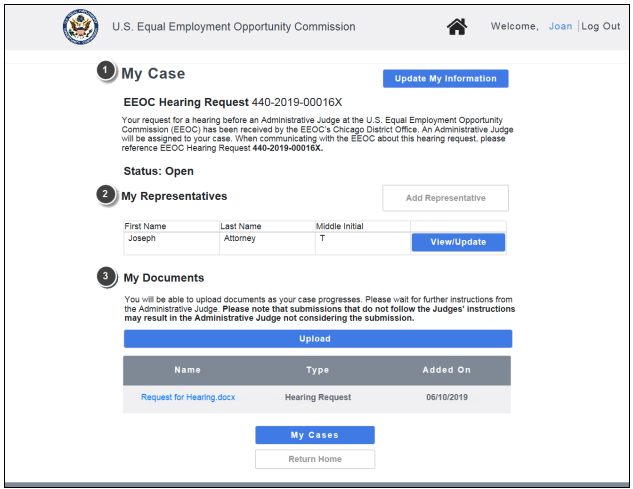
❷ My Representatives. This section displays a table of the (legal or non-legal) representatives you have entered. You may add, update, or delete your representatives here. If you have not entered any representatives, the My Representatives section displays only the Add Representative button. (Chapter 3)
❸ My Documents. This section displays the documents associated with your hearing/appeal/RFR that you have submitted, the agency has submitted, or that the EEOC has sent to you (e.g. Report of Investigation, Initial Acknowledgement Notice). You may view, download, and/or submit documents here. (Chapter 4)
1.1.2 My Case Page for Appeals/RFRs
If you have filed an appeal or submitted an RFR, the My Case page will appear as shown in Figure 3 below (the page shown illustrates the My Case page for an initial appeal, but the My Case page for an RFR is very similar). The page is divided into three sections: My Case, My Representatives, and My Documents.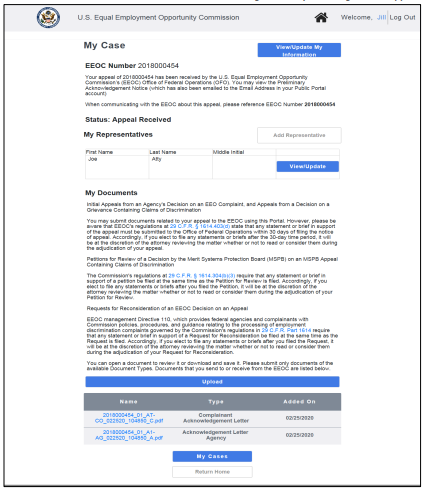
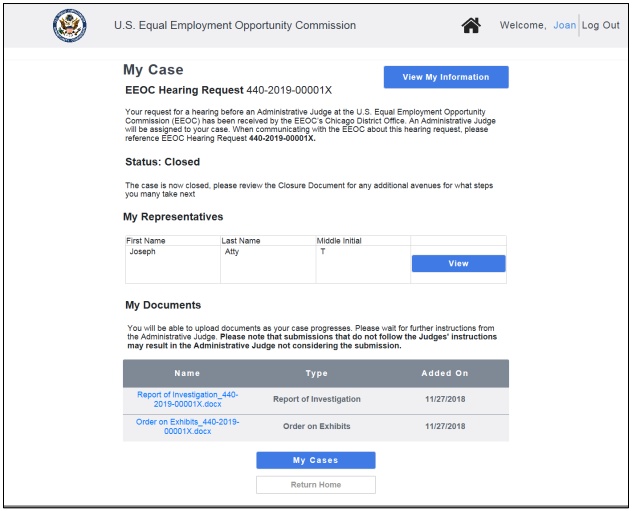
1.1.3 My Case Page for Closed Cases
You may continue to view information for your case after it has been closed. You may not make any changes to the case information or representatives, and you may not submit any documents (though downloading documents is permitted).For a closed case a read-only version of the My Case page will appear as shown in Figure 4 below (the page shown illustrates the My Case page for a closed hearing, but the My Case page for a closed appeal or RFR is very similar). Similar to the page for an open hearing/appeal, the page is divided into 3 sections: My Case, My Representatives, and My Documents.