HomeAboutContact | ...loading...
iconWebsite
TBD Marketplace™

Buy™ | Sell™ | Shop™

Earn 1,000 Book Points for every sample document (and/or template) that you sell!

Help Others

Buy™ | Sell™ | Shop™

TBD Marketplace™
iconWebsite
Buy™Sell™Shop™
iconWebsite
TBD Marketplace™

Buy™ | Sell™ | Shop™

Sell™
iconWebsite
TBD Marketplace™

Buy™ | Sell™ | Shop™

Earn 1,000 Book Points for every sample document (and/or template) that you sell! Help thousands of other litigants who [will] find themselves in your shoes!
Sell™ Now
iconWebsite
TBD Marketplace™

Buy™ | Sell™ | Shop™

Buy™

buy real-live sample court documents/templates

– for free! (ie, with Book Points™)

Sell™

sell your court documents/templates

(earn 1,000 Book Points™ per file)

Shop™ Now

enter the TBD Marketplace™

to help your fellow man/woman

get the justice that he/she deserves!

Broward County's Local Rules of Court
17th Judicial Circuit (Division 04)
Florida

LOCAL RULE 00 | BASIC INFO

Sandra Perlman
Circuit Court Judge
Seventeenth Judicial Circuit in and for Broward County, Florida
SealFlorida Broward County Courthouse
201 S.E. 6th Street
Room 16-131/Courtroom 16-165
Fort Lauderdale, FL 33301
(954) 831-7779
Div04@17th.FLCourts.org
cms@17th.FLCourts.org
Geavonna Lapmarado

Updated 3-30-22
TEMPORARY PROCEDURES FOR THE CORONAVIRUS (COVID-19)
UNTIL FURTHER NOTICE: ALL HEARINGS WILL BE HELD THROUGH ZOOM VIDEO CONFERENCE ONLY.
(UMC, Special Set, and Calendar Call)
PLEASE INCLUDE THE FOLLOWING IN ANY AND ALL NOTICES OF HEARINGS:

Topic: Judge Perlman’s Docket

Join Zoom Meeting

https://17thFLCourts.zoom.us/j/726619094


Meeting ID: 726 619 094

Dial In by your location
+1 312 626 6799 US (Chicago)
+1 646 876 9923 US (New York)
+1 301 715 8592 US
+1 346 248 7799 US (Houston)
+1 408 638 0968 US (San Jose)
+1 669 900 6833 US (San Jose)
+1 253 215 8782 US
888 475-4499 US Toll-free
833 548-0276 US Toll-free
833 548-0282 US Toll-free
877 853-5257 US Toll-free
Meeting ID: 726 619 094

Find your local number: https://17thFLCourts.zoom.us/u/awbnCXPW

Please Note: DO NOT Send Hard Copies of Motions or Materials for UMC, Special Sets or LOP/Case Management Hearings. Please note the Court does not have immediate access to Fedex, UPS and/or mail.

****DO NOT EMAIL PLEADINGS TO THE COURT****

Please upload courtesy copies via the attachments on CMS

See step-by-step video on uploading courtesy copies: https://www.youtube.com/watch?v=04elG0CDPJs&authuser=0

For Hearings Requiring Court Reporters: Parties who desire a Court Reporter will make the necessary arrangements with the Court Reporter to appear by ZOOM at all hearings.
• The Court Reporter will announce their presence.

• Any witness(es) or interpreter will announce their presence, the attorneys must ensure a person authorized to give oaths is present.

• See Supreme Court of Florida, Administrative Order No. AOSC20-16.
LOCAL RULE 01 | COURT HOLIDAYS

2021/2022 Court Holidays

The Broward County Courthouse is closed on the following dates:
HolidayDate
New Year’s Day (Observed)///Friday, December 31, 2021
Martin Luther King, Jr.’s Birthday///Monday, January 17, 2022
Good Friday///Friday, April 15, 2022
Memorial Day///Monday, May 30, 2022
Juneteenth (Observed)///Monday, June 20, 2022
Independence Day///Monday, July 4, 2022
Labor Day///Monday, September 5, 2022
Rosh Hashanah///Monday, September 26, 2022
Yom Kippur///Wednesday, October 5, 2022
Veteran’s Day///Friday, November 11, 2022
Thanksgiving Day///Thursday, November 24, 2022
Day after Thanksgiving///Friday, November 25, 2022
Christmas Eve (Discretionary holiday)///Friday, December 23, 2022
Christmas Day///Monday, December 26, 2022
PLEASE BE ADVISED: The Clerk’s office is approximately 14 days behind in scanning e-filing pleadings. Accordingly, the Court cannot read any pleadings filed within the last 14 days, online. Therefore, if you have replies, response, etc. that are necessary for the Court to review prior to any hearings, please submit courtesy copies via the supporting documents tab for electronic copies, or if you are unable to do so, submit the courtesy copies directly to Chambers 16131 in a timely manner. We apologize for any inconvenience, and appreciate your cooperation.

PLEASE NOTE: Pleadings that are e-filed through the Clerk of Court portal are not sent to the Judge. The Court is not on the e-service list.

REMINDER:
1. Due to the enormous amount of phone calls received daily, we try to explain as much as possible on the divisional procedures to help reduce the amount of calls. If you leave a message regarding something that has already been addressed in the on-line procedures, your call may not be returned.

2. Additionally, due to the volume of mail received and processed on a daily basis, it is impossible for the JA to recall if your order has been signed and/or sent out. Therefore, please do not call the JA to inquire but rather please refer to the clerk’s on-line docket.

3. Please do not submit any pleadings/documents/motions to the JA’s email unless authorized to do so. ALL pleadings/documents/motions must be uploaded electronically, or if unable to do so, sent via mail (USPS, UPS, FedEx, drop off/courier)

LOCAL RULE 02 | EMERGENCY HEARINGS

1. SEE Administrative Order 2014-32 CIV; AO 2021-50 CIV; please follow this link and read it in its entirety BEFORE filing an emergency motion. http://www.17th.FLCourts.org/wp-content/uploads/2017/08/2014-32-civ_amended.pdf

2. After reading Administrative Order 2014-32 CIV; AO 2021-31 CIV, and you determine the emergency is “a matter that will result in irreparable harm, death or result in a manifest injury if immediate relief is not afforded” (5), you must fill out Form A, and follow the next steps.
a. “Matters which do not meet this definition shall not be submitted to the court as an ‘emergency’A.O. 2014-32 CIV (5).
3. Please notify the Judicial Assistant immediately about your Emergency Motion once it has been e-filed. (Div04@17th.FLCourts.org)

4. For any e-filed TRUE EMERGENCY, a courtesy copy of the Motion for Emergency Hearing shall be submitted to the court for review.
a. In the event that the Court is NOT IN SESSION, such requests should be submitted by an attorney to Court Administration (20th Floor).
5. The motion should indicate how much hearing time will be needed and include any supporting information which will help the Judge determine if the matter is an emergency.

6. A proposed order and envelopes must be supplied as well.

7. After the Judge has reviewed the motion, she will give instructions to the Judicial Assistant about setting the motion for hearing. The Judicial Assistant will then contact you with regard to the Judge’s determination.

LOCAL RULE 03 | MANDATORY PROCEDURES FOR ON-LINE SCHEDULING

LOCAL RULE 04 | PROCEDURES FOR ONLINE COURTESY COPIES

1. Please upload your e-filed documents as an attachment when either setting a hearing, or after a hearing has already been set.

2. Please make sure your documents are e-filed prior to uploading.

3. If you are unable to upload courtesy copies via the attachments on CMS, please submit hard copies to Chambers 16131, 5 days prior to any UMC hearing, and 10 days prior to any Special Set hearing.

4. How to upload your courtesy copy documents:
a. See video on uploading:
https://www.youtube.com/watch?v=04elG0CDPJs&authuser=0
5. When setting a hearing:
a. Go to the Calendar Tab
b. Select Show Availability
c. Select in the drop box, Motion Calendar, Special Set, or Calendar Call (Calendar Call- ONLY Joint Pre-Trial Stip. and Motions in Limine may be attached -- DO NOT ADD MOTIONS TO CONTINUE)
i. Pick a date where there’s availability
ii. Enter case number
iii. Once the information is filled out, select “Add Attachment” and upload accordingly
iv. Save
6. After a hearing has already been set:
a. Go to the Calendar Tab
b. Select Show Events By Case
c. Enter your case number and put in the date your hearing is scheduled
d. Select “Add Attachment”, and upload accordingly
e. Save

LOCAL RULE 05 | UNIFORM MOTION CALENDAR

1. Uniform Motion Calendar is Monday - Thursday at 8:45am. All hearings are held in Courtroom 16165 (16th floor of the West building).
a. Reminder -- UMC is 5-10min max. If you require more time to have your motion/motions heard, please special set them.
2. Uniform Motion Calendar hearings must be scheduled using the on-line scheduling system www.cms.17th.FLCourts.org.
a. Failure to schedule your hearing properly will result in your matter not being heard.

b. If you cannot get online to schedule your hearing, please contact the JA for assistance.
3. Local Rule 10A must be complied with before setting any motion, and each Motion must contain a certification by the party that a good faith effort has been made to resolve the matter prior to noticing a hearing.

4. A courtesy copy of the Motion and Notice must be provided to the Court at least 5 working days prior to the hearing via uploading via CMS, or hard copies only if you are unable to do so.

5. We do not accept faxes or emails for pleadings.

6. Make sure a copy of the on-line confirmation is included with your courtesy copies.

7. When a UMC hearing is cancelled and reset on-line you must re-upload your courtesy copies online.

8. If you are a new user or have questions regarding the system, please do not call the JA.
a. Please read the On-line Help to guide you through the scheduling process.

b. You may also contact OSS Support by email at: calendar@17th.FLCourts.org
9. Add-Ons: This is not permitted without prior court approval. Please contact the JA, or submit your request in writing to Chambers 16131.

10. Default Final Judgments:
a. Must be set for a hearing before a judgment will be entered. (even if a default has been entered).

b. Once a hearing on the Default has been heard, and if your Judgment is granted, then you may submit copies of the Final Judgment along with self-addressed stamped envelopes, if the order was not already signed in open-court.

c. Please indicate in a cover letter what date your hearing took place.
11. Telephonic Appearances at motion calendar:
a. Requests for phone hearings will be addressed in accordance with Fla.R. Jud. Adm. 2.530.
b. At least one party must appear in person to sign in.
c. The order must include:
i. The date/time of the hearing, what motion will be heard, and indicate that opposing counsel has no objection.

ii. The name of the attorney/party appearing by phone, and direct phone number they can be reached at. The Judge will then call the attorney when that case is called up for hearing.

iii. The following language must also be included in the order:
1. “(Insert attorneys name) may attend the _______, 2019 hearing by telephone (time permitting), only if the parties meet and confer (either by phone or in person) prior to the day of the hearing. Failure to do so may result in cancellation of the hearing.”
iv. Please upload via CMS with the motion (as an attachment) and the order

v. If these procedures are not followed, it will result in your order being rejected.
12. Please note: telephonic hearings are called last during motion calendar, and time permitting only.

LOCAL RULE 06 | SPECIAL SET HEARINGS 30 MINUTES OR LESS

1. Release of Special Set Dates: We do not post Special Set dates for the entire year.
a. At the end of each month, new dates for the next round of Special Set dates will be released. (Ex: At the end of April, JUNE dates will be released. At the end of MAY, JULY dates will be released).

b. Please do not call the JA asking when the dates will be released. Please check back on the CMS website periodically at the end of each month to check the Court’s availability.
2. It is mandatory that all parties confer regarding availability of each attorney. Users may log on at the same time to see the court’s schedule of available times when selecting the date and time for a hearing.
a. Any party utilizing self scheduling shall consult with and certify they consulted with the other party in obtaining the hearing time in the notice of hearing.
3. Telephonic appearances are not permitted for Special Set hearings. If you have a question regarding this matter, please call the JA, or submit your concerns in writing.

4. You must obtain Court approval if you wish to cancel your hearing less than 2 weeks prior to the hearing, unless the parties have an agreed order resolving the matter, or the issue is moot.
a. Please contact our office when canceling a hearing. We are not on the e-service list, and will not get a notification unless you call, or email us.

b. If you reset a Special Set hearing, please re-submit all courtesy copies under that new hearing date using CMS.
5. A courtesy copy of the Motion and Notice must be provided to the Court at least 10 working days prior to the hearing via uploading via CMS, or hard copies only if you are unable to do so.

6. Add-ons: No double booking or add-on of any hearing is permitted at any time. Sanctions may be imposed for noncompliance. Counsel, in good faith, shall secure the hearing time necessary to give all parties adequate time to argue the merits of the motion.
a. If there is a motion you wish to add-on, please contact the JA to get court approval FIRST!

LOCAL RULE 07 | SPECIAL SET HEARINGS FOR MORE THAN 30 MINUTES

1. You must first e-file the motion and then either mail or have delivered a courtesy copy along with a cover letter indicating the length of time sought for your hearing. (Temp. Procedure: The parties may email the cover letter with motions at: Div04@17th.FLCourts.org)

2. Additionally, please include 5 dates in the month preceding that you and all parties are available. (ex: If you submit a request in September, provide 5 dates in October and November)

3. Once the Judge reviews your motion, the Judicial Assistant will contact you via email to advise you of the Judge’s decision.

4. The party seeking and setting the hearing must notice the hearing. Copy of any written response should also be provided to the Court in advance.

5. You must obtain Court approval if you wish to cancel your hearing less than 2 weeks prior to the hearing, unless the parties have an agreed order resolving the matter.
a. Please contact our office when canceling a hearing. We are not on the e-service list, and will not get a notification unless you call, or email us.

LOCAL RULE 08 | MOTIONS FOR REHEARING AND RECONSIDERATION

You must file a Motion for Rehearing or Motion for Reconsideration with the Clerk, and send a courtesy copy with self addressed stamped envelopes to the Judge’s chambers.

After the Judge has reviewed your Motion, the Judicial Assistant will contact you in the event the Judge determines it is necessary to schedule a time and date to hear the Motion.

LOCAL RULE 09 | GENERAL INFORMATION REGARDING E-ORDERS

1. Please see the following video on how to upload electronic orders ----
https://www.youtube.com/watch?v=5HuTiOq9bno&feature=youtu.be
2. Select Agreed Order, Or Proposed Order
a. If your selection in the proposed, or agreed order section does not give you a title relevant to your specific motion, please select agreed order, but you MUST change the title of the order from “Agreed” to what the title of your order is.

b. Directions on how to change title: once you are in the system and looking at the order, there is what looks like a subject line of an email, and that will say “Agreed Order”. Delete that language and place the title of your order there.
3. No blank spaces are permitted.

4. Do not include the following in the body of the order: “Done and Ordered”, the caption of the case, the title of the order, Judge’s signature block, or the “copies furnished to”. All of this information will be generated for you by CMS.

5. Please preview your order and ensure that the Judge’s signature line is not left on a blank page. Your order will be rejected. Adjust the font size so the order is all on one page, or if the order is multipage, make sure there is language of the order on the page with the Judge’s signature line)

6. At the very end, you will have the opportunity to upload your supporting documents/motions for the Judge to review. There will be a pop up box, press add-attachment, and add accordingly.

7. Please note: If you are using internet explorer, please use google chrome, as you will not be able to upload attachments otherwise.

8. Failure to follow the procedures will result in your order being rejected. If it is rejected, please read the reason included in your notification. Call the JA if you have any questions.

9. If you need assistance, please visit:
http://www.17th.FLCourts.org/index.php/self-help/eorders
10. You may also email OSS Support at: calendar@17th.FLCourts.org, to get help with any questions you may have. The JA may not be able to answer all technical support questions.

11. Any hard copies of orders submitted to chambers, unless directed by Court, will be returned unsigned.

LOCAL RULE 10 | AGREED ORDERS

1. Most Agreed orders can be submitted via e-order.

2. Cases with pro se Litigants who have not provided an email address, cannot be submitted via e-order.

3. Agreed orders must be submitted through CMS, by copy and pasting the body of the Order into the system, or typing it out.

4. Agreed orders must contain the type of motion, and if applicable, the date when the hearing took place.

5. The agreed order must reflect the court's ruling at the hearing

6. The language of the agreed order must be agreed to by all parties.
a. Please include a cover letter indicating this information as an attachment when uploading via e-courtesy.
7. When your order is approved, anyone on the e-service list will receive an email notifying that the order has been approved. The order itself will have the judge’s electronic signature, date and time at the bottom of the last page.
a. Please do not call to see if the Judge has approved an e-order, unless it is urgent.
8. Rejected Orders: If your e-order comes back rejected, you will receive an email. Please read the explanation given. If you do not understand the reasoning, please check the procedures to see if it falls under one of the requirements. If you still do not know why your order was rejected, please call the JA.

LOCAL RULE 11 | PROPOSED ORDERS

1. Most proposed orders can be submitted via e-order.

2. Be sure your order does not indicate “Proposed” in the title or body of the order.

3. Cases with pro se Litigants who have not provided an email address cannot be submitted via e-order. Please submit hard copies with envelopes for all parties.

4. Proposed orders must be submitted through CMS, by copy and pasting your Order into the system, or typing it out.

5. Proposed orders must contain the type of motion, and if applicable, the date when the hearing took place.

6. When your order is approved, anyone on the e-service list will receive an email notifying that the order has been approved. The order itself will have the judge’s electronic signature, date and time at the bottom of the last page.
a. Please do not call to see if the Judge has approved an e-order, unless it is urgent.
7. Rejected Orders: If your e-order comes back rejected, please read the explanation given. If you do not understand the reasoning, please check the procedures to see if it falls under one of the requirements. If you still do not know why your order was rejected, please call the JA.

LOCAL RULE 12 | ORDERS SUBMITTED AFTER A HEARING

1. If the Judge has requested the parties to submit orders after a hearing, either proposed or agreed to, please follow these instructions:

2. If the Judge requests that the parties submit their orders via email:
a. Please make sure the orders are in Word format

b. Email to Div04@17th.FLCourts.org.
3. Proposed Orders Only (i.e.- each party has been requested to provide their own order, with their own wording):
a. Order itself must contain the date when the hearing took place and type of motion.

b. If your order is a multi-page order:
i. It must contain a portion of the language of the order on the page with the Judge’s signature line.

ii. Do not submit an order with a blank page (i.e. no actual language of the order on the page with the Judge’s signature line). This will be rejected. If you must shrink to fit the Judge’s signature line on the previous page of the Order, please do so by changing the size of the font of your document, etc.

iii. Each page of the order shall have, the case number, and the title of the order, in the header of each page, including the page with the Judge’s signature line.
c. Please submit enough copies of the Order for all parties, along with self-addressed stamped envelopes for all parties, unless the parties wish to be sent copies via email. Please indicate email addresses.
4. Agreed Orders Only:
a. Submit via e-courtesy

b. Agreed Order itself must contain the date when the hearing took place and type of motion.

c. The agreed order must reflect the court's ruling at the hearing

d. The language of the agreed order must be agreed to by all parties.
i. Please include a cover letter indicating this information as an attachment when uploading via e-courtesy.

LOCAL RULE 13 | INFORMATION REGARDING E-SERVICE EMAILS

Please be sure to update the system to reflect the accurate email addresses for all ACTIVE PARTIES on any case.

As we move to more paperless options, this is an important form of communication for confirming hearings, setting hearings, delivering time-sensitive Orders, etc.

The Court does not have the capability to remove your email from the website once your party has settled/dropped/etc -- this is your responsibility. Until you remove yourself, you will continue to get updates on the case via e-courtesy.

LOCAL RULE 14 | CASE MANAGEMENT CONFERENCES

1. Court Ordered CMC: If you are ordered to appear in court on a case management conference, court appearance is mandatory.
a. See Supreme Court Administrative Order (AOSC20-23-Amendment-10)

b. Unless an Order of Dismissal, or Notice of Settlement, is filed and received by the Judge on the case prior to the court date.

c. Failure to appear at a case management conference may result in your case being dismissed.
2. Setting of a CMC by the parties:
a. The parties must meet and confer and narrow down the issues prior to setting a CMC hearing.

b. In the event you cannot resolve your issues, the parties may file a Motion for Case Management Conference, which lists the issues, etc. which the parties are seeking to get resolved.

c. This can be set on UMC.

LOCAL RULE 15 | LACK OF PROSECUTION HEARINGS

1. If you receive a LOP and Notice of Hearing, please refer to the document for instructions, and hearing date/time.

2. Please do not call the JA until the week that the hearing is scheduled to find out the status of your case.

3. If the case has settled/dismissed, please email the notice of settlement or voluntary dismissal to Div04@17th.FLCourts.org, prior to the LOP hearing.

LOCAL RULE 16 | 2022/2023 TRIAL DOCKET SCHEDULE FOR JURY AND NON-JURY

CALENDAR CALL IS AT 9:30 A.M.
Calendar CallTrial Period
4/22/20225/2/22 - 5/20/22
5/20/20225/31/22 - 6/16/22
6/16/2022
(Thursday)
6/27/22 - 7/22/22
7/22/20228/1/22-8/19/22
8/19/20228/29/22-9/23/22
9/30/2022
*(previously 9/23/2022)
9/27/22-10/14/22
10/14/202210/24/22-11/10/22
11/10/22
(Thursday)
11/14/22-12/2/22
1/3/231/9/23-1/27/23
1/30/232/6/23-3/2/23
3/6/233/13/23-3/30/23
4/3/234/10/23-4/28/23
5/1/235/8/23-5/26/23
5/30/236/5/23-6/23/23
7/10/237/17/23-8/4/23
8/7/238/14/23-9/1/23
9/5/239/11/23-9/29/23
10/2/23
(Monday)
10/9/23-10/27/23
10/30/23
(Monday)
11/6/23-11/24/23
11/27/23
(Monday)
12/4/23-12/21/23

LOCAL RULE 17 | GENERAL INFORMATION REGARDING CALENDAR CALL

1. Attendance at Calendar Call is mandatory

2. No telephonic appearances are permitted.
a. Please contact JA with any concerns, or submit it in writing to Chambers 16131.
3. No motions of any kind will be heard at Calendar Call.
a. Please schedule any motions PRIOR to Calendar Call.

b. If you are unable to secure a date online before Calendar Call, please contact the JA, and submit a cover letter explaining your need for a hearing and how much time is requested, along with a copy of the filed motion you need heard.

c. You will be contacted by the JA once a decision has been rendered.
4. If you settle/voluntary dismiss your case, and are scheduled for calendar call, please call our office to let us know.
a. Please email the notice of settlement or voluntary dismissal to - Div04@17th.FLCourts.org
5. If there are no settlements/voluntary dismissals filed, you must appear at Calendar Call.

LOCAL RULE 18 | CASES READY FOR TRIAL

1. In accordance with Administrative Order #2010-33 Civ., ALL trials must be scheduled using the on-line scheduling.

2. The parties set their own cases for trial.
a. Please do not set down a notice to set trial on UMC
3. How to set your case for trial (i.e. Generate a Uniform Trial Order):
a. You must first select a Calendar Call date using the online scheduling system. (Please see our available Calendar Call dates above)

b. Once you have selected a date, fill out all the information (i.e. jury or non-jury, and how many days the length of the trial will be, etc..)

c. Once saved, a Uniform Trial Order will automatically be generated and sent to the Judge via e-courtesy to sign.

d. Once signed by the Judge, all parties on the service list will receive a copy.

e. If you are still having issues, please see the HELP tab on CMS.
4. Counsel MUST certify they have consulted with all counsel of record or parties regarding an agreed trial docket setting.

5. No unilateral settings of trial are permitted.

LOCAL RULE 19 | MOTIONS TO CONTINUE TRIAL

1. All Motions to Continue Trial require a hearing on the Uniform Motion Calendar PRIOR to the Calendar Call date.

2. If you are unable to secure a date online before Calendar Call, please contact the JA, and submit a cover letter explaining your need for a hearing and how much time is requested, along with a copy of the filed motion you need heard.
a. You will be contacted by the JA once a decision has been rendered.

LOCAL RULE 20 | NEW COURTHOUSE TECHNOLOGY

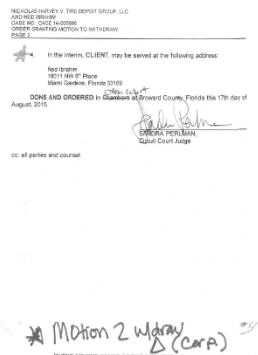
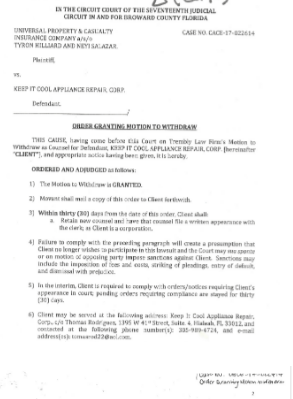
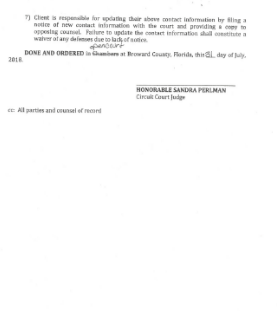
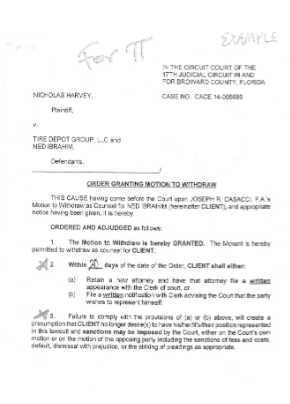
LOCAL RULE 21 | SAMPLE ORDERS ON MOTIONS TO WITHDRAW

Congratulations! You're now booked up on Broward County's Local Rules of Court (Division 04)!

You might need to reference them during your pursuit of justice.

For instance, you might need to understand certain local rules to recover from the damages that lawbreaking judges/lawyers have inflicted upon you (see this example of a Florida judge who outright committed perjury).

As always, please get the justice you deserve.

Sincerely,


www.TextBookDiscrimination.com
Logo-PDF-Adobe Download
YouTubeVideo A Judge's Perjury
logoCases A Judge's Perjury
logoHandbook Handbook: Complaint
logoHTML How-To: Case Management
logoHTML How-To: Continuance
iconWebsite How-To: Cover Sheet (FL)
logoHTML How-To: Default (Clerk)
logoHTML How-To: Default Judgment
logoHTML How-To: eFiling
iconWebsite How-To: File Suit (State)
iconWebsite How-To: Summons
logoHTML How-To: Hearing
logoHTML How-To: Limine
logoHTML How-To: Reconsideration
logoHTML How-To: Rehearing
logoHTML How-To: Sanctions
logoHTML How-To: Settlement
logoHTML How-To: Summary Judgment
logoInfo Info: Motion vs Pleading
logoSamples Sample Court Documents
logoSurvey Survey
Pages That You
Might Also Like
Duval County
Guide: Discovery (USFLMD)
Local Rules of 11th Circuit Local Rules of USFLMD Local Rules of USFLND Local Rules of USFLSD
Civil Rights Attorneys - FL
Pertinent Federal Laws Pertinent Florida Laws
Fla. R. App. P. Fla. R. Civ. P. Fla. R. Crim. P. Fla. R. Gen. Prac. & Jud. Admin.
Regulations
add a comment
IconQuiz IconLike
iconFullScreenBgnIticonFullScreenEndIt
Icon-Email-WBIcon-Email-WG Icon-Youtube-WBIcon-Youtube-WG Icon-Share-WBIcon-Share-WG