HomeAboutContact | ...loading...
Buy™ | Sell™ | Shop™ |
iconWebsite
TBD Marketplace™
iconWebsite
TBD Marketplace™Shop™

4.2 | VIEW/DOWNLOAD DOCUMENTS

In the My Documents section of the My Charge page, you will see a list of the documents associated with your case, that you have sent to the EEOC and those that the EEOC has sent to you. You may download a copy of a document to view it at any time. You may also save the document to your computer.

Some documents must be requested from the EEOC before you can view/download them (e.g., the respondent’s position statement).

The information displayed for each document in the My Documents list is shown in Table 1 below.
Table 1 – Document Information Displayed on the Portal
Column NameDescription
NameThe name of the document. Identical to the document’s file name minus the file extension.
TypeThe document type (e.g. “Charge of Discrimination”).
Added OnThe date the document was uploaded.
Added By The person who uploaded the document:
• “EEOC” if uploaded by the EEOC
• “Charging Party” if uploaded by the charging party
• “Respondent” if uploaded by the respondent
To download a document, perform the following steps:
Step 1. On the My Charge page, in the My Documents section, locate in the list of documents the one you want to download and select the Name to start downloading it.

Step 2. A pop-up message displays indicating that the download may take a while. Select the OK button to continue with the document download (if you do not want to continue with the download, select the Cancel button). SnapshotInstructions
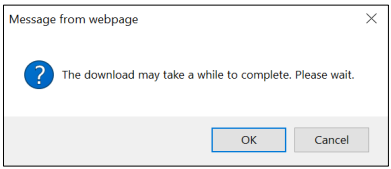
Note: The message may display differently depending on the browser you’re using.

Step 3. The document will be downloaded. Choose to open it, or save the file to your computer or a shared drive, as shown below: SnapshotInstructions If you choose to save it, you will be asked to select a location on your computer where you want it saved. (You may also rename the document if you choose to save it.)

Be sure to save all documents related to your charge, including Email correspondence.
Congratulations! You're now booked up on Section 4.2 from 'Volume 8: Manage Charge Information' of the EEOC's Public Portal User's Guide!
You might need to reference it during your pursuit of justice.

For instance, you might need to examine one of these handbooks in order to protect yourself from organizations/judges/lawyers who break the law (see this example of a Florida judge who outright committed perjury).

Nevertheless – and as always – please get the justice you deserve.

Sincerely,


www.TextBookDiscrimination.com
Buy™ | Sell™ | Shop™ |
iconWebsite
TBD Marketplace™
iconWebsite
TBD Marketplace™Shop™
logoAdobe Download
logoTable Portal
logoSurvey Survey
logoInfo FCHR 101: How it Works
iconMusic Audio: Drop the Steal
YouTubeVideo Video: A Judge's Perjury
logoCases A Judge's Perjury
logoHTML How-To: Disqualification
iconWarning Warning: FCHR Bribery
iconWarning Warning: FCHR Corruption
iconWarning Warning: FCHR Discrimination
iconWarning Warning: FCHR Obstructions
Pages That You
Might Also Like
All-in-One Chapter 4: Submit and Receive Documents
EEOC Regulations
Reading List: Employment Discrimination
How-To: Post-Termination Retaliation How-To: Substantial Weight Review
Opposition vs Participation
Handbook: Right-to-Sue
TBD.C: Charges TBD.D: Determinations
Handbook: FCHR PFR
Shop | TBD Marketplace™
Buy | TBD Marketplace™
Sell | TBD Marketplace™
add a comment
IconQuiz IconLike
iconFullScreenBgnIticonFullScreenEndIt
Icon-Email-WBIcon-Email-WG Icon-Youtube-WBIcon-Youtube-WG Icon-Share-WBIcon-Share-WG