HomeAboutContact | ...loading...
Buy™ | Sell™ | Shop™ |
iconWebsite
TBD Marketplace™
iconWebsite
TBD Marketplace™Shop™

3.0 | ENTER SUPPLEMENTAL INFORMATION

You will have the opportunity to provide additional information you may have, at any time prior to the interview. This information can help make the interview more productive and efficient. To do so:
Step 1. Select My Cases and log in. If the My Cases listing is displayed, select the appropriate inquiry by selecting the Case Number to access the My Charge page.

Step 2. The My Charge page displays with a prompt to enter supplemental information (as shown in Chapter 2 above). Select the Next button.

Step 3. You will be asked a series of four fill-in-the-blank questions. Answer any or all of the questions. Select the Next button after answering a question. When you are finished entering supplemental information select the Save and Submit button.

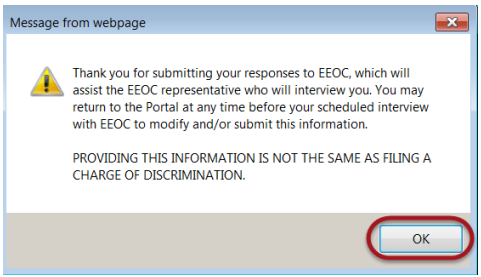
Step 4. A confirmation pop-up window displays. Select the OK button to continue. SnapshotInstructions
Tip! You may return as often as you wish before the interview to edit the information you provided, until the EEOC locks the inquiry.

Tip! Typically, the EEOC will lock the inquiry 24-48 hours before the scheduled interview, to review the information submitted. If you login to the Public Portal when the inquiry is locked, a message displays indicating that “additional information cannot be entered at this time”. You can still view the information you submitted for the inquiry by selecting on the View Inquiry button.

Congratulations! You're now booked up on Section 3.0 from 'Volume 3: Post-Inquiry Tasks' of the EEOC's Public Portal User's Guide!
You might need to reference it during your pursuit of justice.

For instance, you might need to examine one of these handbooks in order to protect yourself from organizations/judges/lawyers who break the law (see this example of a Florida judge who outright committed perjury).

Nevertheless – and as always – please get the justice you deserve.

Sincerely,


www.TextBookDiscrimination.com
Buy™ | Sell™ | Shop™ |
iconWebsite
TBD Marketplace™
iconWebsite
TBD Marketplace™Shop™
logoAdobe Download
logoTable Portal
logoSurvey Survey
logoInfo FCHR 101: How it Works
iconMusic Audio: Drop the Steal
YouTubeVideo Video: A Judge's Perjury
logoCases A Judge's Perjury
logoHTML How-To: Disqualification
iconWarning Warning: FCHR Bribery
iconWarning Warning: FCHR Corruption
iconWarning Warning: FCHR Discrimination
iconWarning Warning: FCHR Obstructions
Pages That You
Might Also Like
All-in-One Chapter 3: Enter Supplemental Information
EEOC Regulations
Reading List: Employment Discrimination
How-To: Post-Termination Retaliation How-To: Substantial Weight Review
Opposition vs Participation
TBD.C: Charges
Shop | TBD Marketplace™
Buy | TBD Marketplace™
Sell | TBD Marketplace™
add a comment
IconQuiz IconLike
iconFullScreenBgnIticonFullScreenEndIt
Icon-Email-WBIcon-Email-WG Icon-Youtube-WBIcon-Youtube-WG Icon-Share-WBIcon-Share-WG