HomeAboutContact | ...loading...
Buy™ | Sell™ | Shop™ |
iconWebsite
TBD Marketplace™
iconWebsite
TBD Marketplace™Shop™

EEOC Public Portal User's Guide
Volume 8: Manage Case Information
Chapter 1
DISPLAYING INFORMATION ABOUT YOUR CASE

1.0 | CHAPTER 1 INTRO

If you have requested a hearing, filed an appeal, or submitted a request for reconsideration (RFR) with the EEOC, as a federal sector employee, applicant or contractor, you can select My Cases on the EEOC Public Portal to view the case information and associated documents. If you have more than one case filed with the EEOC, the My Cases Listing will display all your cases (see Figure 1). This screen displays a list of all the cases (hearings, appeals, RFRs) you have filed with the EEOC and their status. If you have only one case you will be taken directly to the My Case page when you select My Cases on the Portal’s home page.

The My Cases Listing is sorted by submission date, with newest cases listed first. If you have a large number of cases, use the page navigation buttons (<< < > >>) to move between pages. Select the case you wish to view by selecting the Case Number; this will display the My Case page.
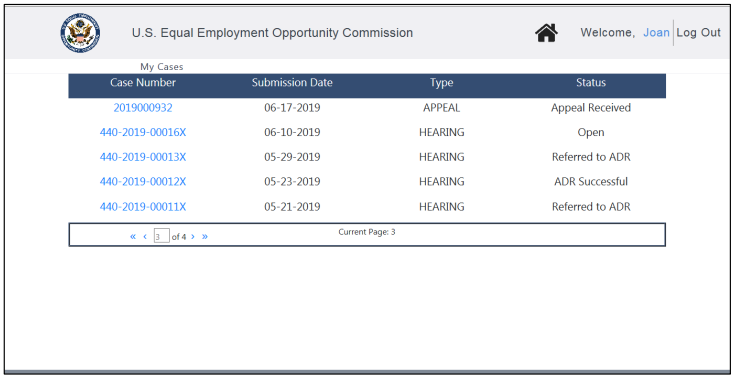
Figure 1 – Example of My Cases Listing
SnapshotInstructions
A hearing, appeal, or RFR case will have different process status as the case progresses. You can find out about the status of your case at any time when you login to the EEOC Public Portal. The case status column displays as follows:
• For hearing requests, the status will be one of the following:
o Open – The hearing request has been submitted to the EEOC.

o Referred to ADR – An invitation to ADR has been sent to both parties and the EEOC is waiting for their response.

o ADR Scheduling – The EEOC is in the process of scheduling an ADR session with both parties.

o ADR Scheduled – The EEOC has scheduled an ADR session with both parties.

o ADR Held – The ADR session was held.

o ADR CompleteADR has been completed.

o ADR Successful – The ADR session resulted in a resolution of the complaint.

o ADR Unsuccessful – The ADR session did not result in a resolution of the complaint.

o Pending AJ Assignment – The EEOC is in the process of assigning the complaint to an Administrative Judge to continue processing.

o Assigned to AJ – The EEOC has assigned the complaint to an Administrative Judge to continue processing.

o Hearing Scheduled – The EEOC has scheduled a hearing on the complaint.

o Hearing Held – The hearing on the complaint was concluded.

o Closure Document Issued – A closure document was issued in the case.

o Closed – The case is now closed.
• For appeals and RFRs the status will be one of the following:
o Appeal Received – The appeal request has been received by the EEOC.

o Complaint File Received – The EEOC has received the complaint file from the agency.

o Complaint File Not Received – The EEOC has not received the complaint file from the agency.

o Appeal Being Processed – The EEOC is working on the appeal.

o Appeal Closed/Issued – The EEOC has issued a decision and closed the appeal.
1.1 | MY CASE PAGE

The My Case page provides information for hearings, appeals, and RFRs, both open and closed cases. Each is discussed in the subsections that follow.

1.1.1 My Case Page for Hearings

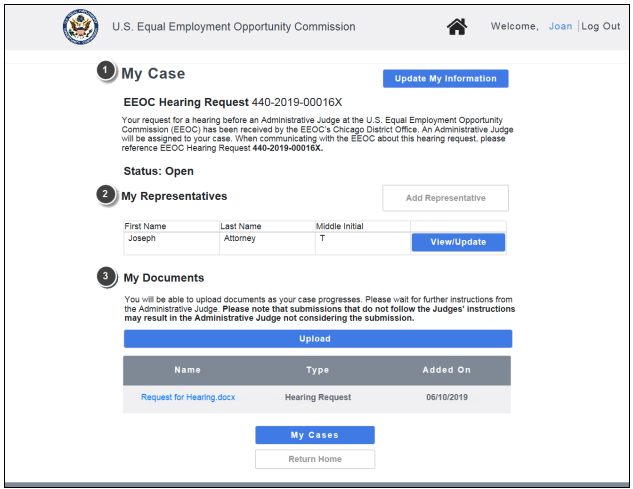
If you have requested a hearing, the My Case page will appear as shown in Figure 2 below (the page shown illustrates the My Case page for a hearing request, but the My Case page for an appeal or RFR is very similar). The page is divided into three sections: My Case, My Representatives, and My Documents. Descriptions of the numbered items follow Figure 2. (NOTE: Numbers are not actually seen on the screen.)

For hearing requests, you will see the following additional information on the My Case page:
• When a hearing status changes, a description will display on the My Case page between the My Case and My Representatives sections (e.g. “A hearing in the case is scheduled”). These are informative and do not require you to respond.

• If the hearing request is eligible for ADR, you will see the invitation to participate in ADR on the My Case page between the My Case and My Representatives sections. For details on accepting or rejecting an invitation to participate in ADR, refer to EEOC Public Portal User’s Guide Volume 6 – Hearings with the EEOC.
Figure 2 – My Case Page for a Hearing Request
SnapshotInstructions
My Case. This section displays the general information about your hearing/appeal/RFR and allows you to update your contact information. (Chapter 2)

My Representatives. This section displays a table of the (legal or non-legal) representatives you have entered. You may add, update, or delete your representatives here. If you have not entered any representatives, the My Representatives section displays only the Add Representative button. (Chapter 3)

My Documents. This section displays the documents associated with your hearing/appeal/RFR that you have submitted, the agency has submitted, or that the EEOC has sent to you (e.g. Report of Investigation, Initial Acknowledgement Notice). You may view, download, and/or submit documents here. (Chapter 4)

1.1.2 My Case Page for Appeals/RFRs

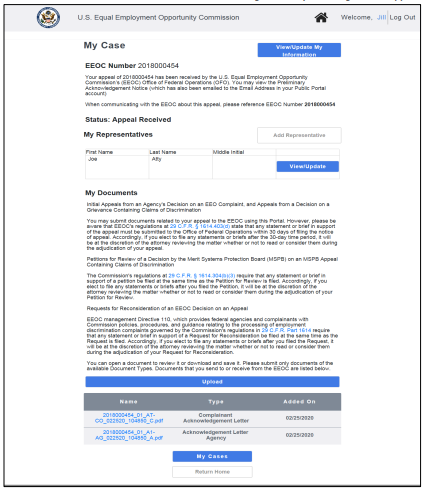
If you have filed an appeal or submitted an RFR, the My Case page will appear as shown in Figure 3 below (the page shown illustrates the My Case page for an initial appeal, but the My Case page for an RFR is very similar). The page is divided into three sections: My Case, My Representatives, and My Documents.
Figure 3 – My Case Page for an Appeal
SnapshotInstructions

1.1.3 My Case Page for Closed Cases

You may continue to view information for your case after it has been closed. You may not make any changes to the case information or representatives, and you may not submit any documents (though downloading documents is permitted).

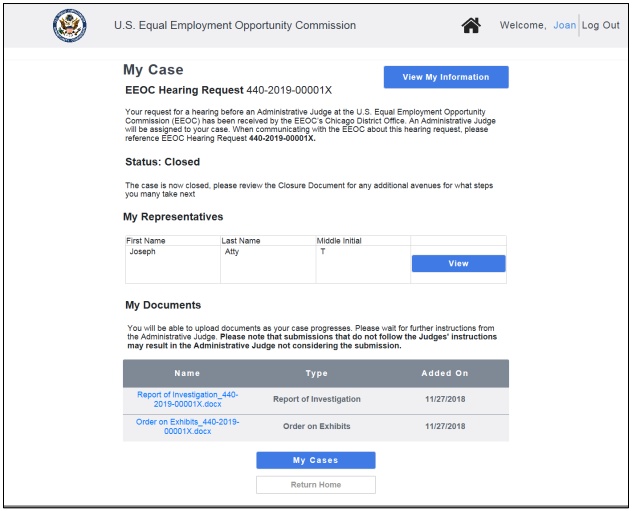
For a closed case a read-only version of the My Case page will appear as shown in Figure 4 below (the page shown illustrates the My Case page for a closed hearing, but the My Case page for a closed appeal or RFR is very similar). Similar to the page for an open hearing/appeal, the page is divided into 3 sections: My Case, My Representatives, and My Documents.
Figure 4 – My Case Page for a Closed Case
SnapshotInstructions
Congratulations! You're now booked up on Chapter 1 from 'Volume 8: Manage Case Information' of the EEOC's Public Portal User's Guide!
You might need to reference it during your pursuit of justice.

For instance, you might need to examine one of these passages in order to protect yourself from organizations that have discriminated against you. Please stay vigilant, though, because you might encounter severe pitfalls along the way (see this example of a Florida judge who outright committed perjury).

Nevertheless – and as always – please get the justice you deserve.

Sincerely,


www.TextBookDiscrimination.com
Buy™ | Sell™ | Shop™ |
iconWebsite
TBD Marketplace™
iconWebsite
TBD Marketplace™Shop™
logoAdobe Download
logoTable Portal
logoSurvey Survey
logoInfo FCHR 101: How it Works
iconMusic Audio: Drop the Steal
YouTubeVideo Video: A Judge's Perjury
logoCases A Judge's Perjury
logoHTML How-To: Disqualification
iconWarning Warning: FCHR Bribery
iconWarning Warning: FCHR Corruption
iconWarning Warning: FCHR Discrimination
iconWarning Warning: FCHR Obstructions
Pages That You
Might Also Like
All-in-One
EEOC Regulations
Reading List: Employment Discrimination
How-To: Post-Termination Retaliation How-To: Substantial Weight Review
Opposition vs Participation
Handbook: Right-to-Sue
TBD.C: Charges TBD.D: Determinations
Handbook: FCHR PFR
Shop | TBD Marketplace™
Buy | TBD Marketplace™
Sell | TBD Marketplace™
add a comment
IconQuiz IconLike
iconFullScreenBgnIticonFullScreenEndIt
Icon-Email-WBIcon-Email-WG Icon-Youtube-WBIcon-Youtube-WG Icon-Share-WBIcon-Share-WG